Blits.ai
AI Technology27-01-20264 min read

MCP Servers and Tools: How LLMs Connect to the Real World

Len Debets
Len Debets
CTO & Co-Founder
MCP Servers and Tools: How LLMs Connect to the Real World

The fastest way to make an LLM useful is to give it tools. MCP (Model Context Protocol) servers make that reliable, secure, and scalable. In this post I’ll explain what MCP servers are, how LLMs use them, why they add real value, and how you can enable them in the Blits.ai platform.

1. What are MCP servers?

An MCP server is a standardized tool endpoint for LLMs. Instead of hardcoding tool integrations for every model and app, an MCP server exposes a set of tools (with schemas, parameters, and descriptions) that any compatible LLM agent can discover and call.

Think of MCP as a “USB‑C port for tools.” The model doesn’t need to know how every tool works internally. It just needs a consistent protocol to discover tools and call them safely.

2. How LLMs use tools and MCP servers

Modern LLMs can decide when to call a tool. When the model sees a request that requires external data or action, it:

  1. Selects the right tool based on its description and schema.
  2. Produces structured arguments.
  3. Calls the MCP server.
  4. Receives a response and continues the conversation.

MCP servers make this flow consistent across providers and tools. The same agent logic can call internal APIs, search indexes, or custom business systems without rewriting the integration layer every time.

3. The added value of MCP servers

MCP servers are not just a technical detail. They solve real business problems:

  • Standardization: One protocol across vendors, models, and tools.
  • Speed: Add or swap tools without refactoring your agent logic.
  • Security: Keep secrets on the server side and avoid exposing internal APIs directly to the LLM.
  • Governance: Centralize tool access, logging, and access controls.
  • Scalability: Reuse the same tool set across multiple assistants and channels.

If you are building agents at scale, MCP is the difference between a prototype and a maintainable platform.

4. The future of MCP servers

MCP servers are likely to become a quiet but essential layer in how AI systems connect to real world tools and data. As models grow more capable the value shifts from raw intelligence to reliable orchestration governance and context control. MCP servers will evolve into standardized trust hubs that manage permissions data flow and execution boundaries across many tools and models. This makes AI systems safer more composable and easier to integrate into serious production environments where control and transparency matter as much as capability.

As MCP adoption grows, tool integration will become as standardized as web APIs are today.

5. How we use MCP servers at Blits.ai (and how you can add them)

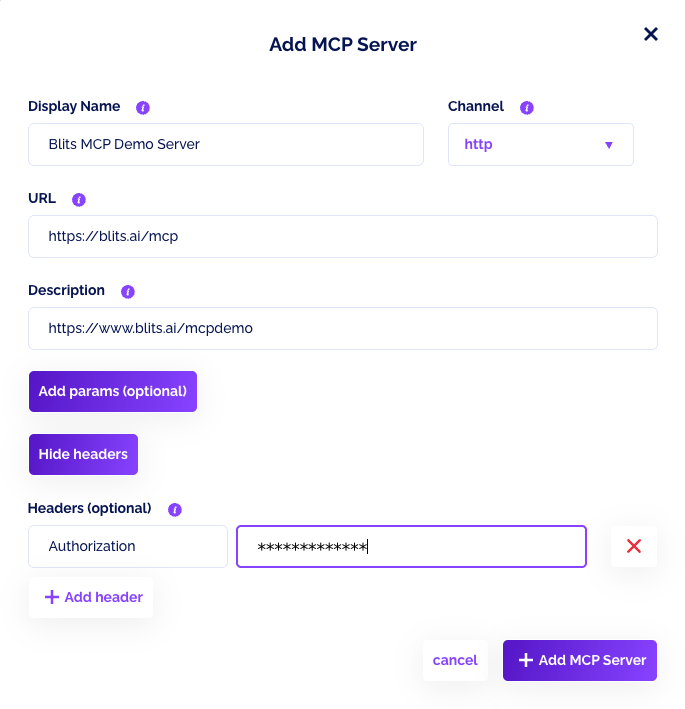
In the Blits.ai platform, MCP servers are part of the LLM tools configuration. You can add your own MCP server in a few steps:

  1. Open your LLM in the admin panel and go to Your LLM tools.
  2. Scroll to MCP Servers and click Add new MCP Tool.
  3. Provide a display name, URL, and description.
  4. Choose the channel (sse or http).
  5. Optionally add headers and params if your MCP server needs authentication or default arguments.

Once saved, the MCP server is available to your LLM and can be toggled on or off. This is how we connect our agents to external systems without hardcoded integrations, and it lets customers bring their own tool stacks into the Blits.ai platform.

6. Best practices for MCP servers

  • Start small: Add a few high‑impact tools first (search, data lookup, CRM).
  • Describe tools clearly: The model relies on tool descriptions to choose correctly.
  • Use least‑privilege access: Only expose what the tool needs to do.
  • Log every call: Tool usage is part of your audit trail.
  • Add timeouts and retries: Tool failures should not break the conversation.
  • Test with realistic prompts: Evaluate how the model selects and uses tools.

7. Try our demo MCP server (football shirt customizer)

We have a demo MCP server running at:

https://www.blits.ai/mcpdemo

It’s built together with partner 270degrees to create a product experience, where you can customize a football shirt in real time. It’s a simple example, but it shows the core idea: the LLM calls tools through MCP to change colors, names, and options in a real UI.

If you want to explore how this works in code, check out the demo page.

Final thoughts

MCP servers are a missing layer between “LLMs that can talk” and “LLMs that can do.” They make tool integration portable, secure, and scalable. If you’re building agents for real business use‑cases, MCP is not optional anymore, it’s the foundation.

Len Debets
Len Debets
CTO & Co-Founder
Published on 27-01-2026

Related Articles

9 Things I Really Hate About AI
AI Technology12-05-2025

9 Things I Really Hate About AI

Read More →
Introducing the Agentic AI Studio for Enterprises
AI Technology17-02-2026

Introducing the Agentic AI Studio for Enterprises

Read More →
Agentic Pay and the Moment AI Was Allowed to Spend Money
AI Technology11-01-2026

Agentic Pay and the Moment AI Was Allowed to Spend Money

Read More →

Stay Updated

Get the latest insights on conversational AI, enterprise automation, and customer experience delivered to your inbox

No spam, unsubscribe at any time

Blits.ai offers tailored services, support and an enterprise platform to create GenAI conversation Digital Humans, voice-bots, agents, custom GPTs and chatbots at scale. Stay ahead of the competition by automatically equipping your agents with the most effective combination of AI technologies for your specific use case. Deploy any use-case and gain full control over quality, enterprise security and AI data processing. Blits.ai combines the AI power of Google, Microsoft, OpenAI, IBM, Anthropic, ElevenLabs, and many others in one orchestration platform. We build, train and deploy LLM based agentic solution using techniques like Conversational AI controlled elements, augmented with deep aspects of GenAI at scale, for any type of use-case and can deploy in the cloud, or on-premise for any enterprise architecture. We create 100% custom tailored Digital humans fro your brand and multi language/country/brand interactive communication fir for your channels (Mobile app, Website, Kiosks and IVR systems) and we connect your backends to build smart agents (ERP, CRM, Helpdesk tool, etc).